Image Editing Guide
Resize Image Online Free: Edit Images Faster
Creating digital content often requires images in different sizes. A photo that looks great on a website may not fit a social media post, blog article, or marketing design. For freelance designers and content creators, adjusting image dimensions is a common task that needs to be fast and simple.
Many people search for ways to resize image online free because they want to change image sizes without paying for expensive software or installing complicated programs. The challenge is finding a tool that can resize images while keeping good quality and providing additional editing features when needed.
A good image workflow is not only about changing dimensions. You may also need to crop photos, add text, adjust colors, or edit different design elements.
In this guide, we will explain how to resize images online for free, how to maintain image quality, and how tools like Webtensil Image can help creators complete everyday editing tasks more efficiently.
Why Resize Image Online Free?
Images are used across many platforms, and each platform has different size requirements.
A large original image from a camera or smartphone may contain more pixels than necessary. Uploading oversized images can slow down websites and make files harder to manage.
Using a tool to resize image online free can help with:
- Faster website loading
- Smaller file sizes
- Easier image uploads
- Better social media performance
- More organized design workflows
For creators who publish content regularly, quickly adjusting image sizes can save a lot of time.
Resize Image Online Free Without Losing Quality
One common concern when resizing images is losing clarity.
The quality depends on how you resize the image and whether you choose the correct dimensions.
Resize Image Online Free With Correct Dimensions
Before resizing an image, consider where it will be used.
Different purposes require different sizes:
- Website images need optimized dimensions for speed.
- Social media posts need platform-friendly ratios.
- Blog images should balance quality and loading speed.
- Client designs may require specific dimensions.
Choosing the correct size before editing helps avoid unnecessary quality loss.
Resize Image Online Free While Keeping Aspect Ratio
The aspect ratio controls the relationship between image width and height.
For example:
- 1920 × 1080 pixels = 16:9 ratio
- 1080 × 1080 pixels = Square ratio
When resizing, keeping the original ratio prevents stretching and distortion.
A good image editor should help maintain proportions automatically.
Common Mistakes When You Resize Image Online Free
Although resizing sounds simple, some mistakes can affect the final result.
Making Small Images Larger
Increasing a small image does not create additional details.
If possible, always start with the highest-quality original image.
Replacing Original Files
Keep your original image before resizing.
Creating different versions allows you to reuse the image for future projects.
Ignoring Image Editing Needs
Sometimes resizing is only the first step.
Creators may also need to:
- Add text
- Adjust colors
- Apply filters
- Crop images
- Move design elements
Using a tool with multiple editing features can make the workflow faster.
A Better Workflow to Resize Image Online Free
Freelance designers and content creators often handle many small image tasks every day.
A typical workflow may include:
- Upload or open the original image.
- Resize the image to the required dimensions.
- Crop unnecessary areas.
- Adjust colors and effects.
- Add text or graphic elements.
- Export the final design.
Instead of switching between multiple applications, using one browser-based editor can simplify the process.
Resize Image Online Free With Webtensil Image
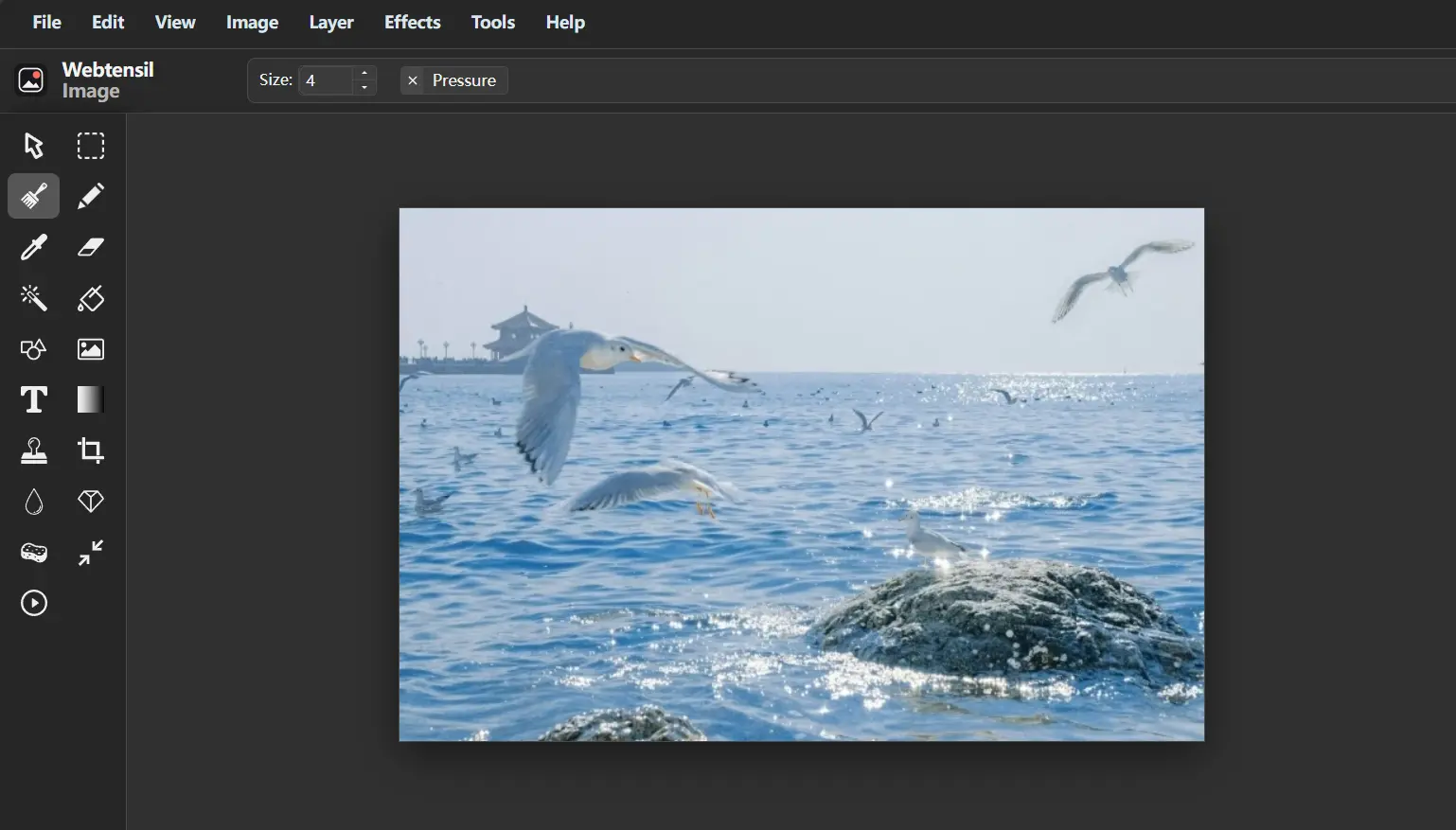
Webtensil Image is a free browser-based image editor designed for creators who need quick and flexible editing tools.
It allows users to resize images while also providing professional editing features.
With Webtensil Image, you can:
- Resize images
- Crop photos
- Manage layers
- Add and edit text
- Use selection tools
- Draw with brushes
- Adjust colors
- Apply blur effects
- Sharpen images
- Use filters
The layer-based editing system makes it easier to manage complex designs.
For example, a social media graphic may include a background photo, title text, and decorative elements. With layers, each part can be edited separately after resizing.
Why Resize Image Online Free Instead of Installing Software?
Professional desktop software can be useful for advanced projects, but many everyday image tasks do not require complicated programs.
An online image editor can be more convenient because:
- No installation is needed
- You can edit from different devices
- Tools are available immediately
- Simple tasks become faster
Webtensil Image works directly in modern browsers including Chrome, Edge, Firefox, and Safari.
It is free to use and does not require account registration or software downloads.
Resize Image Online Free With Better Privacy
When editing images, privacy can also be important.
Freelancers often work with:
- Client graphics
- Private photos
- Marketing materials
- Unreleased designs
Webtensil Image processes core editing tasks locally in the browser instead of requiring images to be uploaded to an application server.
This gives creators more control over their files during everyday editing.
Tips for Better Image Resizing Results
To get better results when you resize image online free, follow these simple tips:
- Start with a high-quality original image.
- Choose dimensions based on the final use.
- Keep the original aspect ratio.
- Avoid repeated resizing.
- Check image quality before publishing.
- Save different versions for different platforms.
These small habits can make your creative workflow faster and more reliable.
What is the best way to resize images?
I use this free online tool to resize images.
How to do it in 30 seconds:
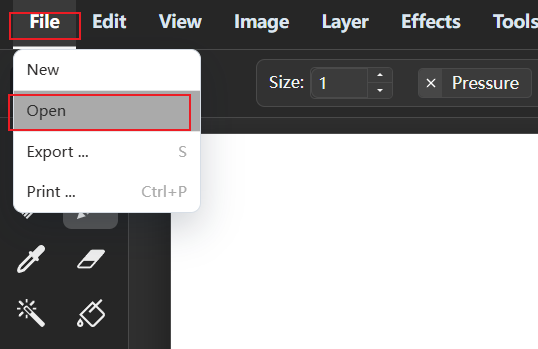
Step 1. Open a file
File > Open
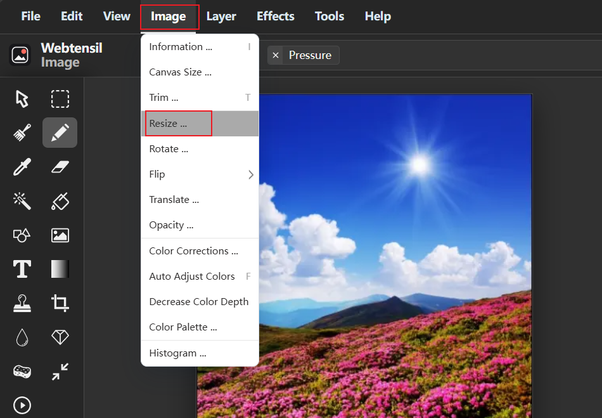
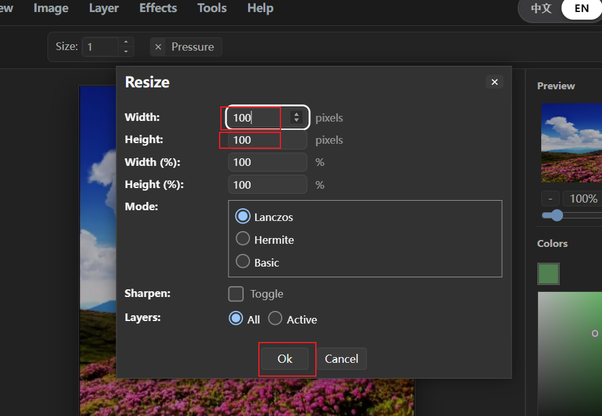
Step 2: Resize the image
Image > Resize
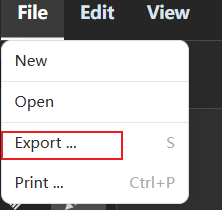
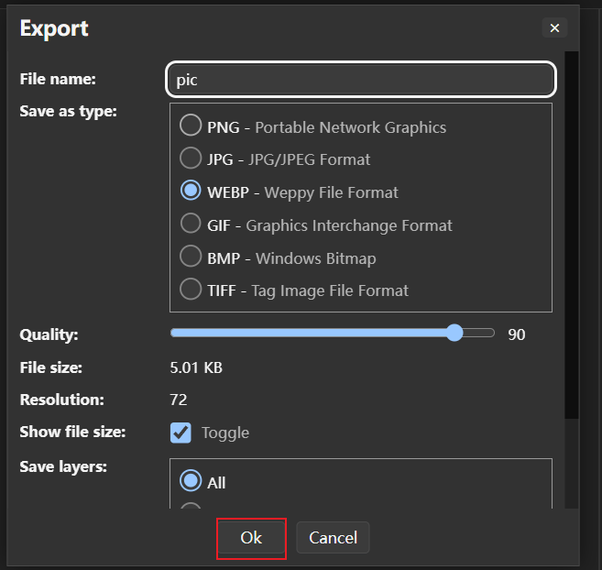
Step 3: Export the image
File > Export
Resize Image Online Free for a Faster Creative Workflow
Learning how to resize image online free can help freelance designers and content creators save time and create better digital content.
The goal is not only to make images smaller or change dimensions. A good workflow should also allow you to edit, adjust, and prepare images for different platforms easily.
Webtensil Image combines resizing, cropping, layers, text tools, and filters in one browser-based workspace. You can create professional visuals faster without installing complicated software.
By choosing the right image size and using efficient editing tools, you can spend less time managing images and more time creating content.